A customer visits your website, downloads a resource, attends a webinar, and eventually enquires about your services. Your marketing team has access to these interactions, but are they using that information to make the next communication more relevant? Or does the prospect continue receiving the same generic emails as everyone else?
This is a common challenge for businesses managing multiple customer touchpoints. Marketing teams often have plenty of customer data but struggle to turn it into timely, meaningful engagement.
This is exactly where Dynamics 365 Customer Insights – Journeys helps. It fills the gap by linking data, automation, and journey orchestration. That means faster responses to behavior and messages that stay consistent across channels.
Let’s explore this guide to uncover its key capabilities, business applications, integrations, and implementation considerations, and where it fits into a business’s marketing strategy.
What Is Dynamics 365 Customer Insights – Journeys?
Microsoft Dynamics 365 Customer Insights – Journeys is a marketing automation and real-time journey orchestration solution. Previously known as Dynamics 365 Marketing or D365 Marketing, the application helps organizations respond to customer segments, behaviors, and triggers across the customer lifecycle. Because it is built on Microsoft Dataverse, it can use shared records such as Contacts, Leads, Accounts, and marketing interactions alongside Dynamics 365 Sales.
The practical shift is significant. Rather than sending the same campaign to a broad audience and waiting for a response, businesses can tailor the next interaction to a customer’s actions, interests, and stage in the journey. So, marketing becomes less about broadcasting messages and more about responding at the right moment with the most relevant next step.
Key Features of Dynamics 365 Customer Insights – Journeys
The best way to evaluate Customer Insights Journeys isn’t by counting features. It’s by looking at how those features change the way you engage customers.
1. Real-Time Customer Journey Orchestration
Marketers can create real-time customer journeys that start with a customer trigger or defined segment. Conditions and branching logic then determine the next interaction based on what each customer does, allowing the journey to adapt as behavior changes.
They can also use A/B testing to compare different versions of emails or other content within a journey. By defining winning metrics such as email opens, clicks, or journey goal events, they can identify which variation performs better and use those insights to optimize subsequent engagement.
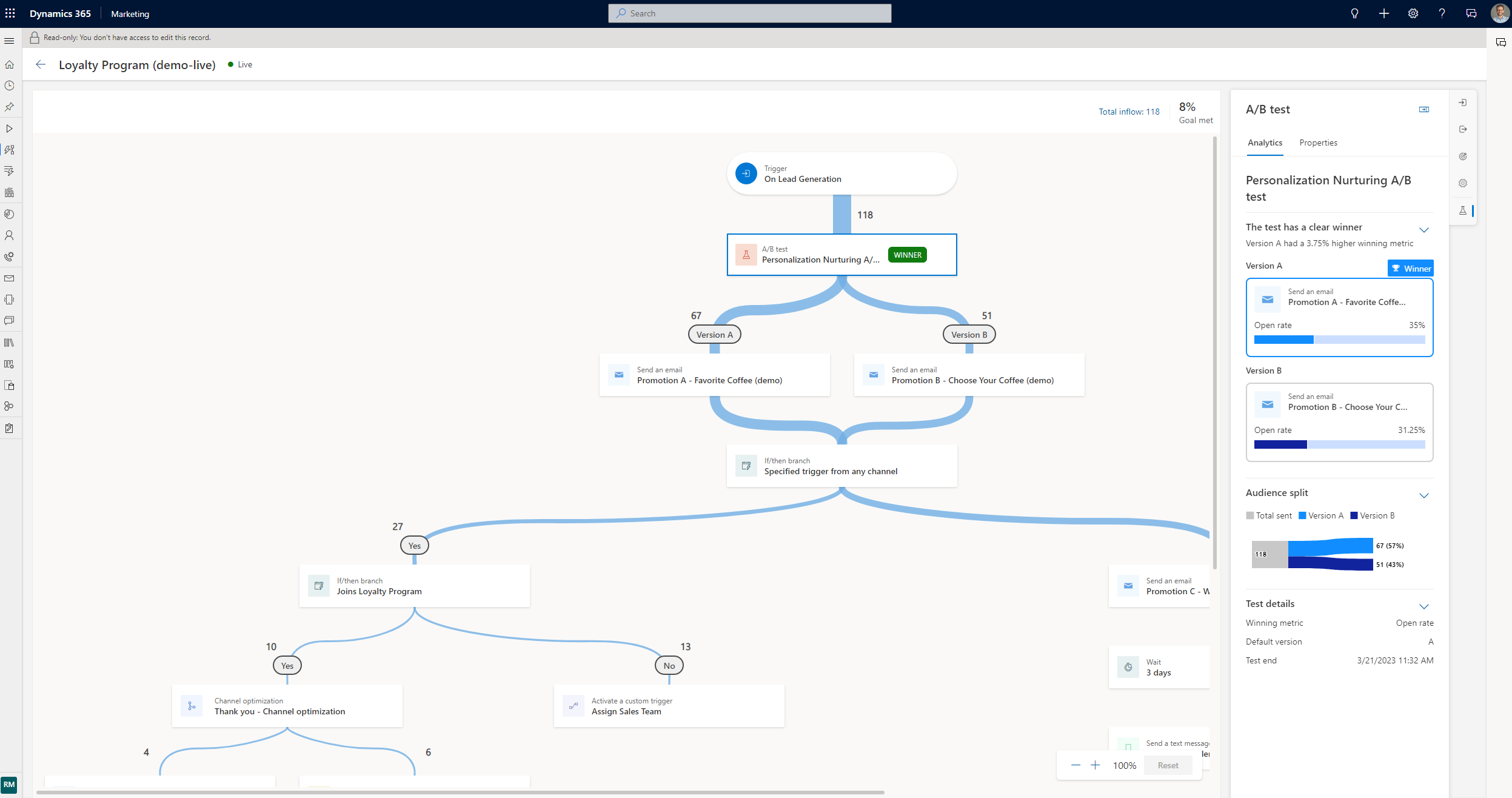
Figure: A/B testing configuration in Dynamics 365 Customer Insights – Journeys, allowing marketers to compare content variations and identify better-performing messages.
For example, if a customer opens an email, the journey can direct them towards a relevant follow-up. If they don’t open it within the defined waiting period, the system can send a reminder through another channel, such as SMS. This allows marketers to create different engagement paths based on customer responses.
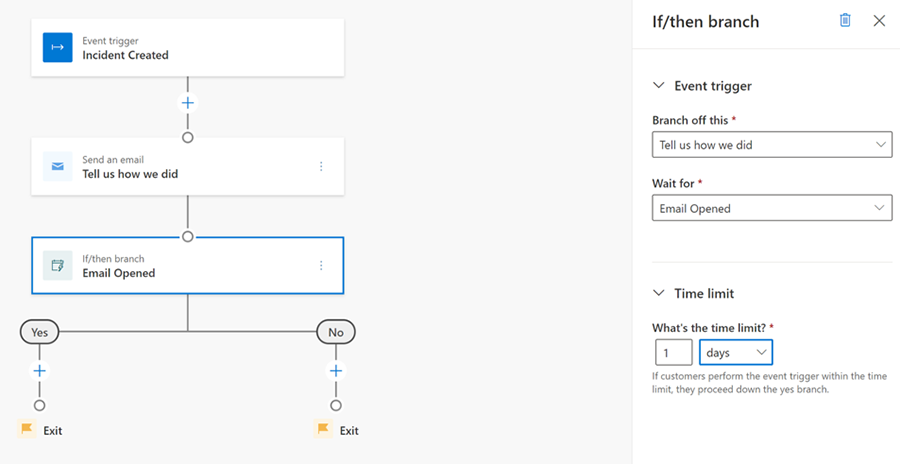
Figure: Conditional branching in Dynamics 365 Customer Insights – Journeys allows marketers to create different follow-up paths based on customer actions, such as opening or not opening an email.
For business leaders, the value of customer journey orchestration is responsiveness. Communication can reflect customer context rather than relying solely on predetermined campaign calendars.
2. Customer Segmentation and Personalization
Marketers can build dynamic segments from customer attributes, preferences, CRM records, and engagement signals stored in Dataverse. If Customer Insights – Data is deployed, unified profiles and measures from external sources can further enrich those segments.
Moreover, Microsoft Copilot can assist with segment creation using natural-language prompts. However, updates from external sources connected through Customer Insights – Data may follow scheduled or incremental refresh cycles rather than operating as instantaneous streams.
The business benefit is straightforward: audiences do not all have to receive the same message simply because they appear on the same database.
3. Multichannel Customer Engagement
Customer Insights Journeys supports digital channels including email, text messages, and push notifications, while Microsoft also provides options for adding custom channels.
Bringing those touchpoints into a coordinated journey can make communication more consistent and help customers receive information through channels relevant to their situation.
4. AI-Assisted Marketing with Copilot and Analytics
Copilot extends automation into everyday marketing activities. Microsoft documents capabilities for creating journey structures using natural language, defining segments, generating email content and rewriting existing copy.
Teams can access journey and engagement analytics to gain customer journey insights, measure progress, and understand customer responses.
The practical opportunity is not to remove marketers from the process, but to reduce routine work and give teams more time to evaluate insights, improve content and refine engagement strategies.

Where Customer Insights – Journeys Can Add Business Value
The true value of customer journey automation is easiest to see in real-world B2B marketing scenarios:
Lead Nurturing and Qualification
When a prospect submits a form or registers for a webinar, the interaction can be recorded against a Lead or Contact in Dataverse and start a real-time journey. Follow-up content can then adapt to signals such as attendance, email engagement, link clicks, or additional form submissions.
Based on qualification rules agreed by marketing and sales, these signals can contribute to lead scoring or status updates. Once a threshold is met, the shared Dataverse record can provide Dynamics 365 Sales with the engagement context needed for follow-up, while native processes or Power Automate can create a task, notification, or opportunity-related action. The exact scoring and handoff logic depends on the organization’s configuration.
Customer Onboarding and Retention
Marketing automation remains useful after a sale. Journeys can respond to milestones such as account activation, incomplete training, product adoption, support interactions, or an approaching renewal. This allows customers to receive setup guidance, training resources, and support content according to their progress rather than a fixed calendar alone.
Event and Webinar Engagement
A journey can manage registration confirmations, reminders, and post-event resources. Recorded interactions can separate registrants, attendees, no-shows, and highly engaged participants into different follow-up paths, giving each group a more relevant next step without requiring the team to manage every response manually.
In our experience, the value comes from continuity, not just automation. When engagement signals guide what happens next, a journey gets smarter. We can adjust the message, shift a customer to a different journey, or hand sales the context to follow up.
Customer Insights – Journeys in Action: Turning Disconnected Engagement into Business Opportunity
For Clariness, a German pharmaceutical company, fragmented customer data was creating a larger business problem: leads could be missed, follow-ups were inconsistent, and sales and marketing lacked a shared view of customer activity.
Intelegain implemented Dynamics 365 Sales and Customer Insights – Journeys to bring customer and engagement information into a more connected sales and marketing process. The solution improved lead visibility, supported automated and personalized communication, and gave both teams better context for follow-up.
The published case supports qualitative outcomes rather than specific performance figures: a more coordinated approach to engagement, more consistent follow-up, and a more scalable foundation for growth. In a German pharmaceutical environment, this type of deployment also requires careful configuration of consent, privacy, and industry-specific governance. The platform provides controls, but it does not make an organization compliant automatically.
Want to see how this transformation came together? Read the full Clariness story here.
Technology Ecosystem and Integrations
Marketing automation becomes more useful when it connects with the applications where customer and business data already resides. Customer Insights – Journeys and Dynamics 365 Sales are built on Microsoft Dataverse, allowing both applications to work with shared records such as Contacts, Leads, Accounts, Activities, and marketing interactions without replicating core CRM data through separate middleware.
Power Automate, APIs, and connectors extend this native data layer. They can connect external ERP platforms, event tools, websites, commerce systems, data warehouses, and third-party applications, or respond to Dataverse business events such as a lead-status or opportunity-stage change. Microsoft’s reference architectures show how these services can connect sales context with automated customer engagement.
Organizations should assess how ERP, CRM, and third-party applications will exchange information with the platform, including data ownership, API capacity, trigger volume, error handling, and refresh expectations. Integration alone is not enough. Poorly governed or inconsistently standardized data can weaken segmentation, personalization, and identity matching across systems.
For enterprises evaluating Microsoft marketing automation, Intelegain’s experience across Microsoft technologies, Dynamics 365, Power Platform, and application integration can support this wider transformation context.

Key Implementation Considerations
A successful D365 Customer Insights – Journeys implementation requires more than configuring automation workflows.
Intelegain implementation perspective: Journey design shouldn’t begin with automation alone. Before building complex journeys, organizations need clarity around customer data quality, consent, system integrations, lead qualification, ownership, and the handoff between marketing and sales. These decisions form the foundation on which effective journey automation is built.
Customer Data Readiness
Start by assessing customer records for duplicates, incomplete attributes, inconsistent formats, and conflicting values. Standardize critical fields before relying on segmentation, personalization, or probabilistic identity resolution, since these capabilities will only be as dependable as the information behind them.
Integration Requirements
Map which CRM, ERP, sales, service, event, commerce, and other business applications need to exchange information. Define data ownership, required flows, expected refresh frequency, trigger volumes, and failure handling before building complex journeys.
Consent and Data Governance
Establish how consent, communication preferences, suppression rules, and governance requirements will be maintained. Customer Insights – Journeys manages consent at the contact-point level, such as an individual email address or phone number, and uses compliance profiles, purposes, and topics to provide granular controls.
Configuration must reflect the laws and industry requirements that apply to the organization, its audience, channels, and locations. These may include the EU General Data Protection Regulation, ePrivacy rules, the US CAN-SPAM Act, and sector-specific requirements such as German pharmaceutical marketing regulations. The platform supports consent management, but organizations remain responsible for legal interpretation, policy design, and compliant operation. This is implementation guidance, not legal advice.
Marketing and Sales Alignment
Agree on what constitutes a qualified lead, when a handover happens, which team is responsible for follow-up and what customer information should accompany that handover.
Adoption and Continuous Optimization
Finally, treat the implementation as an evolving marketing automation strategy. Train users, establish measurable journey goals, monitor engagement and regularly improve journeys based on evidence rather than assumptions.
Is Dynamics 365 Customer Insights – Journeys Right for Your Business?
Customer Insights – Journeys is likely to be a strong fit when an organization already uses Dynamics 365 Sales, Dataverse, or Power Platform; needs real-time, trigger-based engagement; and wants marketing and sales to work from connected records. The business should also have clear qualification rules, consent processes, data ownership, and people responsible for journey governance and optimization.
It may require closer evaluation when data is highly fragmented, identity resolution is a central requirement, or the organization has substantial investments in Salesforce, Adobe, HubSpot, or a warehouse-native data architecture. Decision-makers should compare integration complexity, data-model fit, governance, journey capabilities, licensing, message capacity, and total implementation effort rather than selecting a platform on feature lists alone.
So, the question isn’t what the platform can do. It’s whether your engagement needs call for this much orchestration.
Building More Intelligent Customer Engagement with Intelegain
The shift in customer engagement is from running campaigns in isolation to creating connected experiences that evolve with the customer.
Marketers using D365 Customer Insights – Journeys can orchestrate real-time journeys, build segments from Dataverse data, personalize interactions, and engage customers across channels, with analytics and Copilot assisting execution. When deeper multi-source unification is required, Customer Insights – Data can enrich the profiles and measures available to Journeys.
Technology, however, is only part of the equation. Better customer experiences still depend on reliable data, well-designed integrations, appropriate governance, and clear cooperation between marketing and sales. That makes implementation as much a business transformation exercise as a technology project.
Intelegain’s experience across Microsoft technologies, Dynamics 365, Power Platform, and application integration can help organizations evaluate how these technologies fit their customer engagement requirements.
Looking to make customer engagement more connected and responsive? We can help you explore Microsoft business technologies and identify an approach aligned with your organization’s requirements. Reach out to us to discuss your needs.

FAQs
Think of Customer Insights – Data as the place where disconnected customer data comes together into a single, connected view. Customer Insights – Journeys turns that customer understanding into action, helping businesses personalize interactions across the customer journey.
It lets businesses create journeys that respond to customer actions, such as submitting a form, registering for an event, or engaging with an email. This helps marketers reach people at the right moment without managing every interaction manually.
Businesses can engage customers through channels such as email, SMS, and push notifications. These channels can work together within a journey to create a more connected customer experience.
Certainly. Connecting it with Dynamics 365 Sales helps marketing and sales teams share customer insights, nurture leads, and follow up on opportunities more effectively. Certainly. Connecting it with Dynamics 365 Sales helps marketing and sales teams share customer insights, nurture leads, and follow up on opportunities more effectively.
It uses customer profiles, behaviors, preferences, and interactions to make communications more relevant. This allows businesses to tailor content and journeys to different customers instead of sending the same message to everyone.
A Microsoft partner like Intelegain can help connect customer data, configure journeys, integrate Dynamics 365 solutions, and tailor the platform to specific business needs. They can also support teams after implementation as their marketing requirements evolve.


Turn Customer Insights into Real Results