Optimize Your Business with Microsoft Copilot

AI is no longer just a futuristic buzzword. It has become a practical part of everyday work and is reshaping how tasks get done. Leading this transformation is Microsoft Copilot, an advanced AI assistant built into Microsoft 365 that helps organizations increase productivity, make smarter decisions, and improve collaboration.
For business leaders, IT professionals, and everyday Microsoft 365 users, understanding how Copilot can simplify daily workflows is essential. This article explains what Microsoft Copilot is, the benefits it offers, and the top 10 practical copilot use cases you can start using in your business today.
What is Microsoft Copilot?
Microsoft Copilot is an AI-powered assistant built to enhance productivity across the Microsoft 365 suite, including tools like Word, Excel, Outlook, Teams, and Power BI. Using large language models and machine learning, it understands user commands, generates useful insights, and automates repetitive tasks.
For instance:
- It can create well-written documents in Word.
- It can quickly interpret and assess large datasets in Excel.
- It can summarize long email conversations or meetings in Outlook and Teams.
- It can develop predictive financial reports in Power BI.
By integrating AI directly into everyday business activities, Copilot is becoming a valuable tool for organizations looking to simplify workflows and improve overall efficiency.
Key Benefits of Microsoft Copilot for Businesses
Integrating Microsoft Copilot into daily operations provides a wide range of advantages across different business functions. These include:
- Improved Productivity
Copilot reduces hours of manual work by handling routine tasks such as drafting emails, summarizing information, and preparing reports. This allows employees to focus on tasks that require creativity and strategic thinking. - Data-Driven Decision-Making
With AI-powered insights and analytics, Copilot helps businessesidentify patterns, forecast results, and build strategies supported by accurate data, giving them a strong competitive advantage. - Enhanced Collaboration
Teams can collaborate more smoothly by using Copilot to summarize meetings, track follow-ups, and generate clear action points, helping everyone stay on the same page. - Cost Savings
Automation improves efficiency and reduces operational expenses byeliminating work that would have required significant manual effort. - Better Customer Experience
Using AI-enabled chatbots and personalizedresponses, Copilot helps improve customer interactions and satisfaction while reducing the load on customer support teams. - Compliance and Risk Management
Built-in AI tools canassist in monitoring compliance needs and detecting irregularities in documents, helping businesses stay aligned with regulations.
With the benefits outlined, the next step is to explore how these advantages translate into real applications. Here are the top 10 practical ways businesses can use Microsoft Copilot.
Jensen Huang, CEO of Nvidia: “Acknowledging the growing demand for automation in the software development industry said, Copilot aligns with the trend by automating repetitive tasks and freeing up developers to focus on more creative aspects of coding.”
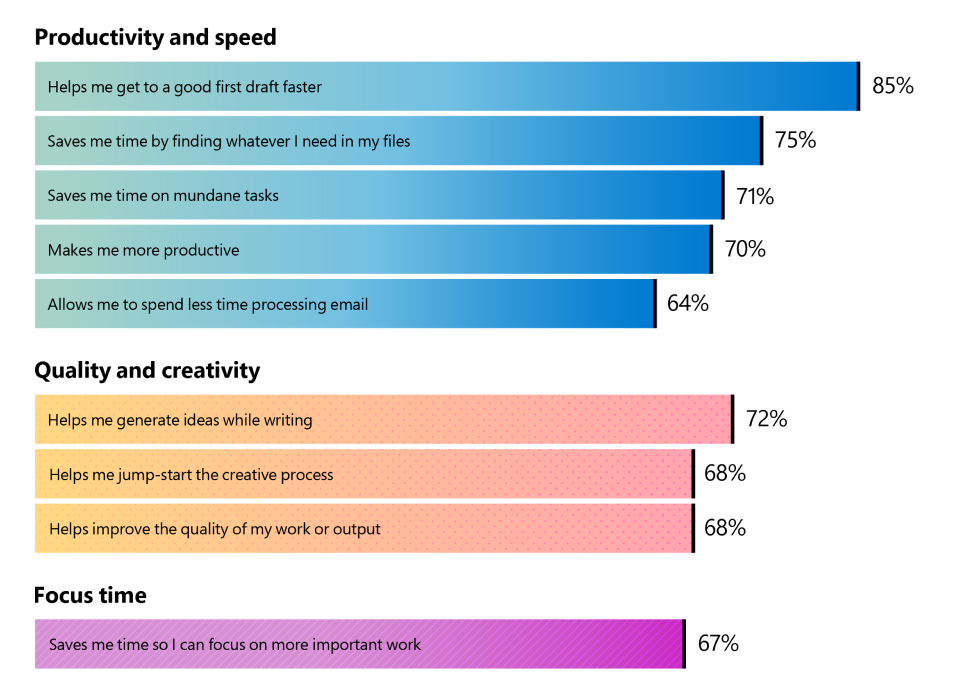
Source: Microsoft Worklab
Top 10 Business Use Cases of Microsoft Copilot
With these benefits in mind, let’s explore the most impactful microsoft copilot use cases for businesses today.
-
AI-Powered Email Management (Outlook)
If managing your inbox takes up too much time, Copilot inoutlook can help by:
- Drafting professional email responses based on the context provided
- Turning lengthy email chains into simple summaries
- Suggesting action items and follow-upsBusiness Impact: Speeds up daily communication and ensures timely, polished responses.
-
Data Analysis and Reporting (Excel)
Copilot simplifies data-heavy tasks by allowing you to:
- Analyze complex datasets and generate trends using natural language
- Create detailed charts and reports in a few seconds
- Forecast sales and market movements using AI-driven predictions
Business Impact: Enables quicker data processing and supports better decision-making.
-
Document Creation and Refinement (Word)
Copilot makes documentation easier by helping you:
- Draft reports, agreements, or memos from simple prompts
- Improve writing quality through clarity, grammar, and style suggestions
Business Impact: Makes content creation faster while maintaining a polished, professional finish.
-
Meeting Summaries and Task Tracking (Teams)
Teams becomes more productive with Copilot features such as:
- Transcribing meetings and summarizing key discussions
- Tracking and assigning action items automatically
Business Impact: Prevents missed details and streamlines post-meeting follow-ups.
-
Low-Code App Development (Power Apps)
Creating business applications becomes more accessible through Copilot:
- Build low-code or no-code apps based on your requirements
- Get workflow and automation recommendations in Power AutomateBusiness Impact: Allows organizations to create custom digital solutions without needing expert developers.
-
Customer Support Enhancement (Power Virtual Agents)
Improve customer service performance by using Copilot to:
- Build chatbots that handle customer queries in real time
- Automate responses to common questions and escalate complex issues to agents
Business Impact: Improves customer satisfaction and reduces pressure on support teams.
-
Sales and CRM Automation (Dynamics 365)
Copilot supports sales teams by helping them:
- Automate lead scoring and deal tracking
- Generate sales forecasts and personalized upsell suggestions
Business Impact: Increases sales efficiency and supports stronger revenue strategies.
-
Financial Forecasting and Risk Analysis (Power BI)
Finance teams can make smarter decisions using Copilot to:
- Build live forecasting models for revenue, expenses, and budgets
- Present insights through clear visual dashboards
Business Impact: Strengthens financial planning and reduces errors in predictive analytics.
-
Knowledge Search and Content Discovery (SharePoint and OneDrive)
Finding information becomes easier with Copilot’s ability to:
- Instantly locate data from documents, emails, or shared files
- Summarize content or extract important points
Business Impact: Saves time and helps employees access insights faster.
-
Automated Compliance and Risk Monitoring
Maintain compliance with less manual effort by using Copilot to:
- Identify risks, review documents, and run AI-based compliance checks
- Detect anomalies early for proactive risk control
Business Impact: Lowers regulatory risk and minimizes the chance of penalties.
How to Get Started with Microsoft Copilot?
If you are ready to see how Copilot can transform your business processes, here are the steps to begin:
Step 1. Evaluate Your Requirements
Identify areas in your organization where repetitive work, heavy data usage, or workflow delays are slowing things down. This could include communication tasks, data handling, or customer service.
Step 2. Confirm Microsoft 365 Availability
Copilot works within Microsoft 365 applications, so make sure your team is using the correct subscription plan.
Step 3. Start Small and Expand Gradually
Begin with simple tasks, such as automating emails, then move on to more advanced capabilities like data analysis or forecasting.
Step 4. Educate and Integrate
Offer training to help your team understand Copilot’s features. Integrate the tool into your current workflows to ensure smooth adoption.
Step 5. Review and Improve
Track Copilot’s impact and identify more microsoft copilot use cases to expand adoption.
Conclusion:
Microsoft Copilot is more than a productivity solution. It acts as a smart digital helper that takes on repetitive and time-consuming tasks, allowing teams to focus on more meaningful work. Whether it is drafting professional emails or interpreting complex data, Copilot helps businesses operate with greater speed, clarity, and efficiency.
Now is the right time to equip your team with the tools of the future. Explore AI-driven productivity and experience how Microsoft Copilot can elevate your organization. Get started with a free Copilot demo and see its impact firsthand.

FAQs
Absolutely. It analyzes datasets, finds trends, creates charts, and explains insights in simple language.
Document automation, customer support responses, meeting summaries, analytics, and workflow automation.
It suggests code, fixes errors, explains logic, and helps speed up development.
Yes, it condenses long emails, PDFs, and reports into quick, readable summaries.


Optimize Your Business with Microsoft Copilot